How to Set Up Cutting Parameters?
Before Setting Up:
You can click "Make" to set up the "Mode," "Cutting Mat," "Cutting Parameters," and "Material Parameters". Hover over the mouse on the "?" icon (the "?" is unclickable if not set up) and click "click here" to check the cutting parameters listed below.
LOKLiK iCraft:
Material Settings:
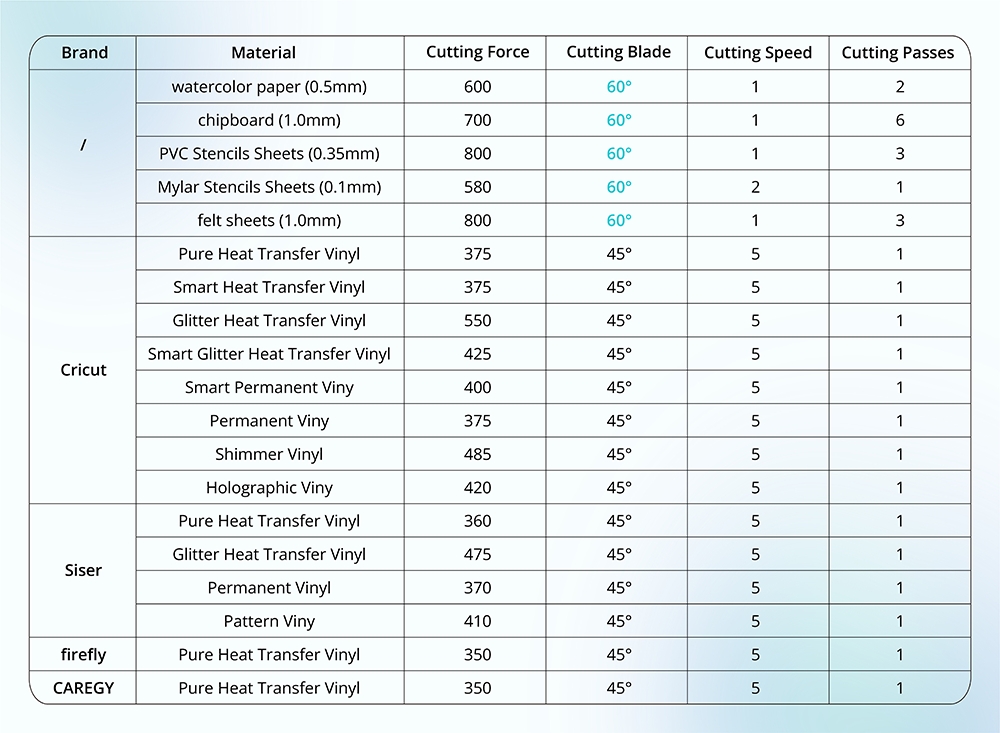
Please refer to the chart below for more cutting settings. If you cannot find your material below, try a test cut with a similar material setting. If you cannot cut through the material under maximum pressure, try to cut more times.
Notes:
-
Ensure the blade is in good condition and fastened.
-
Calibrate the cutting force before cutting to find the best cutting force value.
FAQs:
Cannot cut through the material, or the cutting force is too strong?
- ① Calibrate the cutting force and adjust the cutting parameter to cut again.
- ② The blade may dull after a long time of use; please replace a new blade and cut again.
- ③ Ensure the blade is fastened or the blade housing is functional; otherwise, fasten the blade or replace the blade housing.
LOKLiK Crafter:
Blade Instruction:
- 45° Red Blade: Fine-point blade is suitable for cutting thin materials, including heat transfer vinyl, permanent vinyl, sticker, printable vinyl, etc.
- 60° Blue Blade: Deep-point blade is suitable for cutting thick materials, including cardstock, chipboard, PVC/mylar stencil sheets, felt, etc.
Cutting Setting Instructions:
-
Cutting Force Value:
- LOKLiK/HTVRONT: 1.0 - 11.0; the bigger the value, the heavier the force.
- Other Brands: 100 - 800; ditto.
- (*Higher value is recommended for thicker materials.)
- Cutting Speed: 1-10; the higher value means faster speed. (*Lower speed is recommended for thicker materials.)
- Cutting Passes: 1-10; if you need to cut thick or rigid material, you can try to cut the material twice or more.
Material Settings:
Please refer to the chart below for more cutting settings. If you cannot find your material below, try a test cut with a similar material setting. The maximum cutting thickness for the LOKLiK Crafter is 1.0mm. The maximum thickness varies depending on the rigidness and thickness of the materials. If you cannot cut through the material under maximum pressure, try to cut more times.


Black Friday Gift