DTF Printer

HTVRONT aims to create a world-leading DIY ecosystem platform with the philosophy of "Creativity Makes Life Better."


We provide outstanding and affordable heat press machines, vinyl cutter, DTF printers, laser engraving machines, and paint-by-numbers machines. HTVRONT will continuously iterate its products to transform cold industrial machines into devices that are warmer, friendlier, simpler, and smarter, enabling everyone to enjoy the joy of bringing their creativity to life!


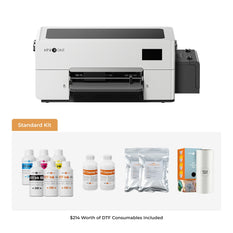
Now featuring the all-new D2 DTF Printer — The Worry-Free Start for Your DTF Business. Designed for beginners and small business owners, the D2 delivers reliable performance with no clogged printheads, easy setup, and all-in-one software, so you can start creating and selling with confidence.


This page mainly covers DTF printers, ovens for DTF printers, and DTF-related consumables.


Filter:
  • $3,499.99 Regular price
    Regular priceSale price
    $3,499.99
  • $59.00 Regular price
    Regular priceSale price
    $59.00 $99.00
  • $2,199.00 Regular price
    Regular priceSale price
    $2,199.00 $3,199.00
  • $69.99 Regular price
    Regular priceSale price
    $69.99
  • $399.00 Regular price
    Regular priceSale price
    $399.00 $499.00
  • $39.99 Regular price
    Regular priceSale price
    $39.99
  • $15.99 Regular price
    Regular priceSale price
    $15.99
  • $59.99 Regular price
    Regular priceSale price
    $59.99

DTF Printer FAQs

What is a DTF printer?

A DTF (Direct-to-Film) printer is a specialized device that prints designs onto PET film using pigment-based inks. The printed design is coated with adhesive powder and heat-cured, then transferred to fabric using a heat press. DTF printing is versatile, working on various fabrics like cotton and polyester, and produces vibrant, durable prints ideal for custom apparel. Unlike traditional methods, it doesn’t require fabric pre-treatment, making it popular for small-scale and professional use

When DTF printing, should I mirror the image?

Yes, you absolutely should mirror (flip) your image when DTF printing.
This is a non-negotiable rule of the DTF process, and here's why:
How it works: When you DTF print, your design goes onto a special PET film first. After adding adhesive powder and curing, you place that film onto your garment with the printed side facing down. That "flip" reverses everything left-to-right.
Quick test: Write an "R" on clear tape, flip it over, and stick it on a window. Look from the other side—that "R" is now backwards. DTF works exactly the same way. Skip mirroring, and your final design will be reversed.
The only time it doesn't matter: Perfectly symmetrical designs (circles, symmetric patterns) look the same either way. But to build good habits, mirror every DTF design—then you'll never accidentally create backwards prints.

Should I buy a dedicated dryer for my DTF printer?

Yes, you absolutely should invest in a dedicated DTF dryer or curing oven—it's essential for professional results.
Here's why: After printing your design on PET film and applying adhesive powder, that powder needs to be properly melted and cured to bond with the ink. A dedicated dryer ensures even heat distribution at the right temperature (typically 100–120°C or 212–248°F) for consistent curing.
Without one, your transfers may crack, peel, or fail after washing. While some beginners try using a heat press as a shortcut, it's inefficient for production and can't match the consistency of a proper conveyor dryer.
If you're just starting with low volume, consider a A3 oven or entry-level conveyor dryer. For growing businesses, larger models with automated powder handling and fume extraction will save time and deliver professional-grade durability.

How to make DTF transfers with an inkjet printer?

To make DTF transfers with an inkjet printer, use a modified printer with pigment-based DTF inks. Create a high-resolution, mirrored design in software like Photoshop. Print it onto PET film (matte side). While the ink is wet, evenly apply DTF adhesive powder. Cure the powder at 120–140°C for 2–3 minutes using a heat gun or oven. Place the film on fabric, heat press at 160–170°C for 15–20 seconds, cool, and peel off the film

How much is a DTF printer?

DTF printer costs vary based on model and features. A modified inkjet like the Epson L1800 costs $500–$800. Dedicated DTF printers range from $1,000 to $15,000, depending on print resolution and capabilities. Additional costs include DTF inks ($50–$100), PET film ($20–$40), and a heat press ($200–$400).

Can you use a sublimation printer for DTF?

No, you cannot directly use a sublimation printer for DTF (Direct-to-Film) printing. Sublimation printers are designed to work with sublimation ink and paper, which transfer dyes into polyester materials through heat.

DTF printing, on the other hand, requires specialized DTF ink (including white ink), PET film, and adhesive powder, which are not compatible with sublimation printers. Attempting to use a sublimation printer for DTF could lead to poor results or damage to the printer.

However, with significant modifications to the printer and the use of appropriate DTF inks, some users have experimented with converting sublimation printers for DTF, but this is not recommended for standard use.

How to use a DTF printer?

To use a DTF printer, design a high-resolution image and mirror it in software. Load PET film into the printer and print using DTF inks. Apply adhesive powder evenly to the wet ink, cure at 120–140°C for 2–3 minutes, then place the film on fabric. Heat press at 160–170°C for 15–20 seconds, cool, and peel the film to reveal the transfer
Unboxing & installing D2 DTF Printer - D2 Lesson 1

Unboxing & installing D2 DTF Printer - D2 Lesson 1

HTVRONT

Welcome to the first installment of our D2 DTF Printer tutorial series. This guide walks you through the authentic unboxing experience and step-by-step initial installation of the HTVRONT D2 DTF...

How to use D2 DTF Printer for the first time

How to use D2 DTF Printer - From software download to DTF printing

HTVRONT

This is the second installment of our D2 DTF Printer tutorial series. Building on the unboxing and installation guide, this article walks you through everything you need to prepare before...

HTVRONT D2 DTF Printer - White Color

What is D2 DTF Printer? The Worry-Free Start for DTF Business

Tia Isom

What is the D2 DTF Printer? It's a desktop DTF printer designed to make starting your DTF business worry-free—no clogged printheads, even when powered off. No More Clogged Printheads –...

D2 DTF Printer printing Mother's Day T-shirts

Love You, Mom! Business Inspiration for D2 DTF Printers

Tia Isom

No clogged printheads. No costly maintenance. No heavy upfront investment. The D2 DTF Printer is the worry-free start for your DTF business. The heat press featured in this video is...

Fresh DTF print-Stunning crochet-style Virgin Mary

Fresh DTF print-Stunning crochet-style Virgin Mary

Tia Isom

This video features the Heat Press used: Auto Heat Press 2. Temperature, pressure, and time are fully adjustable, and the retractable drawer-style tray helps speed up T-shirt production. It’s a...

Auto Heat Press 2 for pouches, bags & wall art

Auto Heat Press 2 for pouches, bags & wall art

Tia Isom

Your browser does not support the video tag. Featured product: Auto Heat Press 2. Projects shown: Zipper pouches, canvas bags, and wall art — explore the creative possibilities. What other...

Daily maintenance of the D1 DTF Printer

Daily maintenance of the D1 DTF Printer

Tia Isom

This video walks you through daily maintenance for the D1 DTF Printer to help extend machine life and maintain consistent, high-quality output. You’ll learn practical steps to reduce downtime, prevent...

D1 DTF Printer Software Guide - BetterPrinter

D1 DTF Printer Software Guide - BetterPrinter

Tia Isom

This page introduces the D1 DTF Printer and the BetterPrinter software used with it. You’ll find a short video guide that helps you understand the basic workflow and get started...

D1 DTF Printer Software Guide - RIIN

D1 DTF Printer Software Guide - RIIN

Tia Isom

This article shows how to produce commercial-grade T-shirts with a heat press by controlling four essentials: alignment, pre-pressing, peel timing, and a second press. You’ll learn to standardize placement with...

DTF Printer Software Guide - How to Set up RIIN

DTF Printer Software Guide - How to Set up RIIN

Tia Isom

This video walks you through setting up RIIN software for the D1 DTF Printer. You’ll learn how to choose the right canvas size, enable continuous printing for smoother batch jobs,...

Read More >>