Making your craft projects a success is our major focus because we believe the sky's the limit when it comes to creativity. We aim to improve functionality and simplify your experiences in expressing your ideas.
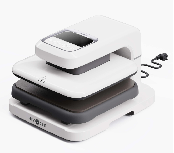
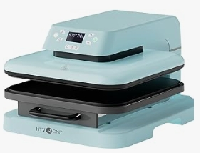
As a result, we’re introducing to you the new HTRONT Automatic Heat Press II-Digit which comes in a sleek, ergonomic, compact design that fits perfectly well in crafting spaces, small or large. This updated version of the first-generation model is suitable for home and business use. It has an auto-down & up mechanism and a slide-out tray for easy loading and unloading of your materials.
Its advanced program guarantees accuracy in setting the right temperature, pressure, and press time to ensure a professional experience and outcomes. With its increased pressing height of up to 4.5 cm and a 15-minute auto-off safety feature, the new HTVRONT Automatic Heat Press II-Digit is the right bestie to have in crafting projects.
New & Upgraded Features
HTVRONT Automatic Heat Press II-Digit has been built on the foundation of the first-generation automatic heat press model. However, the new model has advanced heating technology, enhanced pressure control, and automation of controls. This model that we’re launching is suited for both new crafters and pros because of automation and flexibility in projects. Here are some of the key upgrades and features:
Save Time in Your Crafts with Increased Heat-up Time
The new HTRONT Automatic Heat Press II-Digit allows you to reach high temperatures ( up to 410°F or 210°C ) in less than 2 minutes, which is faster than the first model. This is a time saver in your projects which means you can now handle more projects in a day than before.
Create at Ease with the Automatic Pressure System
Say goodbye to manually setting up your pressure during heat pressing. The pressure system controls in HTRONT Automatic Heat Press II-Digit have been automated to be more even in both distribution and sensitivity. This increased efficiency in your projects.
Experience High Efficiency with Smart Control User Interface
This new model has a touchscreen that comes with pre-set options for different materials. The intuitive touch screen makes it easier to operate. The gadget turns itself off if not used for 15 minutes because safety is our top priority.
Source: YouTube.com
Handle more with the Larger Plate Surface
The plate surface of this new model has been increased allowing you to work with up to 4.5 cm pressing height. This enables you to meet various crafting needs and allows you to try different crafting projects. You’re not limited in terms of size now.
Source: YouTube.com
Using your HTVRONT Automatic Heat Press II-Digit in projects
Using the new Automatic Heat Press II machine from HTVRONT is even much easier compared to the first generation. The automation of features means you only need to know your temperature and press time settings, the rest is easy-peasy. It’s not as complicated as you might think, it’s more like operating your smartphone. Follow these six simple steps below to get you started on using your new Heat Press II gadget.
Step 1: Powering on Your Automatic Heat Press II Machine
Connect your machine to a power socket and let it energize. Now press on the “ Power ” button for the machine to turn on. Once it’s on, the tray will be automatically released. The default settings of your temperature, time, and pressure will be set at 100°C/210°F, 20s, 20kg/50lb .
Step 2: Setting Up the Heat Press
The next step is to set the correct temperature, time, and pressure according to your project's requirements. Use the control panel to make your desired settings. Also, this new model's automation of the pressure function means you don’t need to set the pressure manually.
The machine will automatically apply the correct pressure based on the thickness of the materials you want to heat press. Once set, the heating plate will begin to warm up while the “ Start ” key flashes red.
Step 3: Pre-Heating your Garment
Now, place your garment on the lower platen making sure it’s flat enough. Do a quick 2 to 3-second pre-press so that you remove all the wrinkles and moisture. This will create a smooth surface for you to have improved results in your vinyl projects. Place a parchment paper or teflon sheet over the materials before pre-pressing.
Step 4: Positioning Your Designs
Now place the materials you’re working on such as your shirt or any other fabric on the ironing mat. You can use high-temperature tape to hold your garment or any materials you’re working with on an ironing mat. For your vinyl designs on garments, confirm the adhesive side is facing down and the shiny side up. Make sure the ironing board back is pushed back to the innermost side for accurate pressing.
Step 5: Start Your Pressing Process
After perfectly positioning your material and the designs, press the “ Start ” button for the machine to close the heat press while starting the countdown. Don’t worry about the pressure because this will be automatically applied by the machine for the set time duration. You just have to wait for the press to release once the set time is complete, and carefully remove the garment or materials you were heat pressing.
Step 6: Finishing & Inspection
Once the countdown comes to an end, the pressing will be completed and the heating plate will automatically be raised and the parameters on reset mode. Remove your garment or materials and peel off the carrier sheet immediately if you were working with a hot peel vinyl.
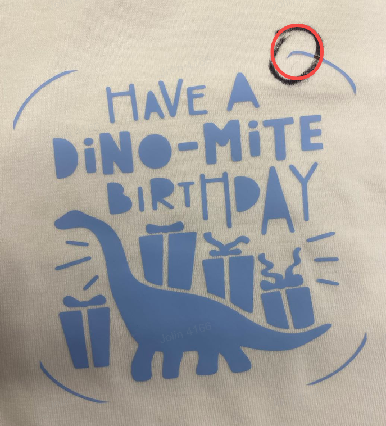
Let the garment or the material cool down before peeling when dealing with a cold peel vinyl. Now check your designs to confirm if they’ve adhered fully and evenly to your garment or material. You can repeat the heat pressing process if some of the areas on your design have not adhered properly.
Automatic Heat Press II-Digit vs. Automatic Heat Press I
The table below summarizes how HTVRONT Automatic Heat Press II compared with Automatic Heat Press I. Have a look so that you know what you’ll be getting from your new Automatic Heat Press II-Digit and why you need to upgrade from the first-generation model.
FEATURE
HTVRONT Automatic Heat Press II
HTVRONT Automatic Heat Press I
Picture
Color
White, Light Bubble Blue, Lavender Purple
White, Light blue
Pressure range
Adjustable pressure, 20-80 kg
Fixed pressure value 60 kg±5 kg
Timing range
1-999s
1-199s
Heat pressable height
4.5cm
2.5cm
Control mode
LED display+silicone button
LED display+silicone button
Bluetooth function
No
No
With or without the WIFI function
No
No
With or without APP
No
No
Customization Mode
4 (A, B, C, D)
2 (A, B)
Built-in mode
4 (1, 2, 3, 4)
4 (1, 2, 3, 4)
Does it support program update
No
No
Display size
76*37cm
49*25cm
Screen angle
7 adjustable angles (in the range of 0-75°, every 10° or so)
Angle non-adjustable, fixed value 60°
Loss rate
Wash durability
Sublimation
HTVRONT Automatic Heat Press II-Digit vs. Vevor
Feature
HTVRONT Automatic Heat Press II
Vevor Automatic Heat Press
Thumbnail
Release date
November 2024
February 2024
Price
***
$219.99/$239.99
Material
Plastic
Plastic
Machine Size
53*43.5*33cm
54.99*41*30.73cm
Machine Weight
19.6kg
20.46kg
Surface finishing
Combination of glossy and matte finishes
Combination of glossy and matte finishes
Colors
Daisy white, bubble blue, lavender purple
Blue+black
User interface
Mechanical buttons and LED display
Mechanical buttons and LED display
Packaging(0-10 scores)
9
8
Heating plate
38*38cm
37.5*37.5cm
Temperature setting
Custom Adjustment from 100°C to 210°C/212-410°F (in increments of 5)
Custom Adjustment from 0°C to 250°C/32°F-482°F
Time setting
Custom adjustment from 1 to 999 seconds
Custom adjustment from 1 to 999 seconds
Pressure control
Adjustable pressure, 20-80 kg
Adjustment from P-1 to P-2 for low pressure test (estimated 50KG).
Maximum pressing height
4.5cm
2.3cm
Heat-Up Time
5-6 minutes to full temperature
8-9 minutes to full temperature
Built-in modeS
4
3
User-Defined Modes
4
/
Continuous cycle
Available
Available
Performance test(0-10 scores)
9
8
Button quantity
10
4
Parameter adjustment method
Button adjustment and +/- keys
Button adjustment and +/- keys
Intelligent material-parameter matching
Unavailable
Unavailable
Pressing mechanism
Automatic pressing
Automatic pressing
Screen angle
Customizable between 0 and 75 degrees, adjustable in approximately 10-degree increments
Fixed angle
Base of use test(0-10 scores)
8.5
8.3
Overall test score
84.61
83.1
Frequently Asked Questions (FAQs)
Here are some of the frequently asked questions by buyers and potential buyers of HTVRONT Automatic Heat Press II-Digit. Have a look at them so that you learn more about this amazing machine.
What happens if I don’t get good pressing results with the recommended parameters in the material library?
First of all, confirm that you’re working with the right consumables/carriers and of high quality. Pre-press the carrier before using it in your project for the pressing effect to be much better. Lastly, follow the correct operation steps in pressing.
What should I do if the machine shows an E1/E2/E3/E4/E5 error message?
If this happens, please cut off the power immediately. Wait for a while for the machine to cool down and restart it again. If this error code persists, please contact HTVRONT customer service after-sale desk. They’re always available throughout the week and on weekends.
Is the beeping sound normal when the machine is on?
Yes, there will be a beeping sound once you switch on the machine, when it reaches your temperature settings when the automatic countdown comes to an end, and when you power it off. However, when the screen displays the letter “ E ” plus some numbers with a continuous beeping sound, there must be an issue. Switch it often to reset or call HTVRONT customer care for further assistance.
What materials can I use with HTVRONT Automatic Heat Press II?
HTVRONT Automatic Heat Press II can work best on cotton, polyesters, and their blends. For best results in your projects, consider using different types of Heat Transfer Vinyl, Sublimation Transfers, and Puff vinyl.


 Cart Unlocks Add-On Deals