Introduction
Sublimation tumblers have surged in popularity for their ability to showcase vibrant, permanent designs on drinkware. Whether you’re crafting for fun, gifting, or running a business, nailing the heat press process is critical. One of the most important variables? Knowing exactly how long to heat press your tumbler. This guide breaks down the ideal time, temperature, and technique—plus common pitfalls to avoid—so you can achieve professional results every time.
Let’s start with the science behind the process—sublimation itself.
What Is Sublimation?
Sublimation is a heat‑activated process where solid dye turns into a gas and bonds permanently to a polymer‑coated surface, producing a design that won’t peel, crack, or fade.
When the ink reaches the right temperature, it transforms directly from a solid to a gas, embedding itself into the coating of the tumbler. This creates a smooth, dishwasher‑safe finish that outlasts traditional surface prints. Because sublimation tumblers have a special polymer layer, the design becomes part of the substrate—not just a layer on top.
Understanding the process is one thing—controlling the time and temperature is where the magic really happens.
The Importance of Time and Temperature
The sweet spot for sublimation is a precise balance: too little heat or time results in faded transfers, while too much can cause blurring, ghosting, and color shift.
Think of it like baking: a few degrees too low and your cake is raw; a few minutes too long and it burns. Sublimation behaves similarly. Under‑curing leaves the ink only partially bonded, so it washes out or looks dull. Over‑curing distorts fine details and can even scorch the coating. Achieving consistent, vibrant results relies on matching the exact settings recommended for your specific press or oven.
So, what are those magic numbers? Let’s break them down.
How Long to Heat Press a Sublimation Tumbler
The standard guideline is 5 to 7 minutes at 350°F to 400°F (175°C to 200°C), but the exact settings depend on your equipment, tumbler coating, and design density.
-
Type of Heat Press:
-
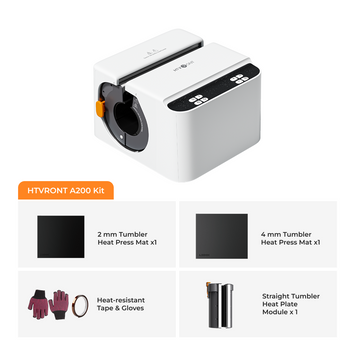
Tumbler Heat Press Machine: Typically 5–6 minutes at 375°F (190°C). These presses wrap the tumbler evenly, so you often don’t need to rotate if the heating element encircles the entire mug.
-
Convection Oven Method: Usually 6–7 minutes at 375°F (190°C) with a shrink wrap sleeve to maintain pressure. A slight rotation halfway through is recommended for even heating.
-
Tumbler Material and Coating: Always use stainless steel tumblers with a sublimation‑ready polyester coating. Uncoated mugs will not accept the dye, no matter how long you press.
-
Design Complexity: Darker, heavily saturated designs may need an extra 30–60 seconds for complete gas‑out. Pastel or light graphics may be ready at the lower end of the time range.
-
Environmental Factors: Room temperature and humidity can affect sublimation. Pre‑warming the tumbler for 10–15 seconds evens out the starting temperature and helps prevent uneven results.
🔍 Pro Tip: If you’re using a mug press that only heats one side at a time, rotate the tumbler 180° at the halfway mark to ensure the entire design is fully sublimated.
Now that you know the numbers, let’s walk through the entire workflow—step by step.
Step‑by‑Step Guide to Heat Pressing a Sublimation Tumbler
Step 1: Gather Your Materials
You’ll need:
- Sublimation tumbler (polymer‑coated)
- Sublimation design printed on sublimation paper with sublimation ink
- Heat‑resistant tape
- Tumbler heat press machine or convection oven
- Heat‑resistant gloves
-
Teflon sheet or silicone pad (optional, protects press)
- Shrink wrap (if using an oven)
Step 2: Prepare the Tumbler
- Wipe the tumbler with rubbing alcohol to remove any oils, dust, or fingerprints.
- Trim your printed design to size and wrap it tightly around the tumbler.
- Secure the design with heat‑resistant tape at the edges and seams to prevent shifting.
Step 3: Preheat the Heat Press or Oven
-
Tumbler Heat Press: Set to 375°F (190°C) and timer to 5–6 minutes.
-
Convection Oven: Preheat to 375°F (190°C). Wrap the tumbler in a shrink wrap sleeve for even pressure.
Step 4: Press the Tumbler
-
Using a Tumbler Heat Press: Place the tumbler inside and close the press. Ensure it fits snugly. If the heating element doesn’t fully encircle, rotate the tumbler 180° after 3 minutes.
-
Using a Convection Oven: Place the wrapped tumbler on a tray. Rotate it halfway through the cycle for uniform heating.
Step 5: Remove and Cool
Using heat‑resistant gloves, carefully remove the tumbler. While the surface is still warm, peel off the sublimation paper in a smooth motion—hot peeling gives the best release and minimizes ghosting. Allow the tumbler to cool completely on a rack before handling the final design.
Even experienced crafters run into issues—here’s how to spot and fix the most frequent ones.
Common Mistakes and How to Avoid Them
-
Under‑Sublimation (Faded Design): Increase pressing time by 30–60 seconds or verify the temperature is correct. Ensure your tumbler is indeed coated for sublimation.
-
Over‑Sublimation (Blurry/Ghosting): Reduce the time slightly or lower the temperature by 5–10°F. Make sure the paper wasn’t shifting during press.
-
Uneven Sublimation: Usually caused by poor pressure or contact. Use a well‑calibrated press, or if using an oven, ensure the shrink wrap is tight. Rotating the tumbler also helps.
-
Peeling or Smudging: Always remove the paper while warm. If you wait until it’s cold, the paper can stick and pull up ink. Hot peeling is the industry standard for sublimation.
Tips for Perfect Sublimation Tumblers
-
Pre‑warm the tumbler: A few seconds of pre‑heat removes surface moisture and promotes even dye release.
-
Use high‑quality consumables: Sublimation‑grade paper, ink, and properly coated blanks are non‑negotiable.
-
Test before production: Run a sample tumbler to dial in your exact settings—every press is slightly different.
-
Rotate for evenness: Unless using a full‑wrap press, always rotate the tumbler halfway through to avoid cold spots.
-
Store blanks properly: Keep tumblers in a dry, dust‑free environment to prevent coating degradation.
Frequently Asked Questions
Can I use a regular kitchen oven for sublimation?
No. Regular ovens often have temperature swings and can absorb sublimation residue, making them unsafe for food use afterward. Dedicated convection ovens or tumbler heat presses are strongly recommended.
What happens if I press the tumbler for too long?
Over‑pressing can cause the ink to over‑sublimate, resulting in blurry outlines, color shifts (especially browns turning greenish), or a rough surface texture. Stick to the recommended times.
Can I reuse sublimation paper?
No. Once the ink has been heat‑activated and transferred, the paper cannot be used again. It’s a single‑use transfer medium.
Why should I hot peel instead of cold peel for sublimation tumblers?
Hot peeling while the ink is still gassing out prevents the paper from cooling and sticking to the design. It reduces the risk of ghosting and leaves a cleaner finish.
Conclusion
Mastering the time and temperature for sublimation tumblers is the key to unlocking vibrant, long‑lasting custom drinkware. While the general rule is 5–7 minutes at 375°F, your specific equipment and materials will guide the final numbers. Follow the step‑by‑step process, avoid common pitfalls, and always test on a blank first. With a little practice, you’ll produce stunning, professional‑grade tumblers that everyone will love. Ready to heat things up? Your perfect creation awaits.


 Cart Unlocks Add-On Deals