Back-to-School DIY with the A100 Multi Heat Press: Custom Sashes, Shirts, Hats & More
Written by Tia Isom
|
Published on
|
Modified on
|
Reading time for 7 min
Introduction
Summary: This guide walks you through five personalized back‑to‑school projects — all made with a single heat press. You'll learn how to craft a custom sash, T‑shirt, cap, mug, and name labels, complete with a video tutorial and expert tips.
With the 2026 back‑to‑school season approaching, now is the perfect time to start crafting. The first day of school is a milestone — and what better way to celebrate than with personalized, handmade keepsakes that your child will proudly wear and use all year long? From the classic first‑day photo to thoughtful teacher gifts, this season is all about creating memories.
With the HTVRONT A100 Multi Heat Press, you don't need a room full of equipment to bring those ideas to life. This single machine handles everything from soft T‑shirts and curved caps to flat fabric sashes and ceramic mugs. In this guide, we'll walk through five easy back‑to‑school DIY projects you can make with the A100, starting with a stunning personalized school sash — and we've got an exclusive video tutorial to show you exactly how it's done.
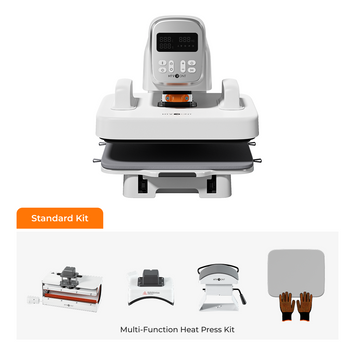
The A100 is designed with busy parents and beginner crafters in mind. It features automatic pressure, fast and even heating, and interchangeable attachments that click into place in seconds. Here's what you can tackle with just one machine:
Flat plate attachment: perfect for T‑shirts, tote bags, fabric sashes, and pencil pouches.
Hat press attachment: gives a curved, snug fit for caps without shifting.
Mug press attachment: wraps around ceramic mugs for all‑over designs.
Whether you're making a full set of school gear or a last‑minute teacher gift, the A100 helps you finish each project quickly and professionally — no guesswork needed. If you're new to pressing, the auto‑pressure system is especially forgiving compared to manual clamshell models.
A personalized sash makes any first‑day outfit memorable. Our design combines a handprint, bold grade lettering, and playful appliqués with rhinestone details. Press play to see the entire process in action.
Quick Visual Guide
Prepare the sash. Iron it flat and pre‑press with the A100 flat plate attachment.
Add the handprint. Choose your favorite color (acrylic paint works great) and apply it to your child's hand, then press firmly onto the sash. For the name or graphic, use a vinyl cutter to cut glitter HTV or Pure color HTV, weed the design, and press with the A100 using the T‑shirt (flat plate) attachment.
Apply text and numbers. Position the grade or year below the handprint, press, and peel the carrier sheet while warm.
Finish with appliqués and rhinestones. Secure playful iron‑on patches with the A100, then attach rhinestones with fabric glue for extra sparkle.
Pro Tip: The large platen lets you press the full design in just a couple of cycles, keeping layers aligned.
Project 2: Matching First‑Day T‑Shirt
Why stop at a sash? Create a matching T‑shirt to complete the look. Use the same handprint and text design files for a coordinated set that will stand out in every photograph.
Place the shirt on the A100's flat plate and pre‑press for 5 seconds to remove moisture and wrinkles.
Position the HTV elements in mirror image, press according to the vinyl's time/temperature settings, and peel warm or cool as directed.
For multi‑layer designs, press the base layer first, let it cool slightly, then add the next layer. The A100's consistent heat avoids under‑pressing or over‑melting previous layers.
This step answers a frequently searched query: "how to make a DIY first day of school shirt with a heat press." With the A100, it's a straightforward afternoon project — even if you've never crafted before.
Project 3: Personalized Baseball Cap
Hats are a school staple — make them one of a kind with a name, monogram, or tiny mascot icon. The A100's hat attachment is curved to fit cap panels snugly, preventing the shifting that often ruins hat projects on flat presses.
Swap to the A100's hat attachment. Place the cap so the target area rests flat against the heating element.
We like to use Puff vinyl or glitter HTV — they're both fun and dimensional, adding a standout look to any cap. Avoid thick, rigid vinyl that can crack when the cap flexes.
Press in small sections if your design crosses a seam; the attachment's shape makes repositioning simple.
Project 4: Custom Teacher Mug
Start the school year with a thoughtful gift for the teacher. A personalized mug with "Best Teacher Ever," a name, and a school year is both practical and heartwarming.
Use the A100 mug attachment with either sublimation paper or heat transfer vinyl rated for ceramics.
Have your child write or draw a design, scan it, print onto sublimation paper, and press. The result is a gift that's truly from the heart.
Note: Sublimated mugs should be hand washed and kept out of the microwave to preserve the image. If you use adhesive or HTV, hand washing is also best.
Project 5: No‑Lost Name Labels for School Supplies
Water bottles, lunch bags, and pencil pouches disappear in classroom chaos — but not with custom fabric labels.
Press onto fabric items using the A100 flat plate. Place a folded towel inside bags to create an even surface and prevent scorching the opposite side.
Are HTV labels really washer‑safe? Yes — when pressed with correct temperature and pressure, they withstand countless washes without peeling. If you've ever wondered "why does my vinyl peel after washing?", the culprit is almost always insufficient heat or pressure. The A100's consistent pressing eliminates that guesswork.
If you're weighing options, our heat press collection makes it easy to compare sizes and features — so you find the one that fits your crafting space.
Quick Back‑to‑School Pressing Checklist
Run through these points before every project to avoid common mistakes:
✅ Pre‑press garment/sash for 5 seconds to remove moisture and wrinkles.
✅ Mirror your design before cutting (especially critical for text).
✅ Check HTV type — warm peel or cool peel? Follow product specs.
✅ Use the correct attachment: flat plate, hat press, or mug press.
✅ Protect your project with a Teflon sheet or parchment paper during pressing.
✅ For layered designs, press bottom layers first, then add top layers.
✅ Always let rhinestone glue cure fully before handling the sash.
Care & Longevity Tips
Garments and sashes: Turn inside out before washing. Use cold water and a mild detergent. Air dry or tumble dry low. Never iron directly on HTV — the direct heat can melt the adhesive.
Sash decorations: Hand wash is safest if you've added fabric appliqués or rhinestones. Even slightly agitative machine cycles can loosen glued embellishments.
Mugs: Hand wash only, especially if sublimated. Do not microwave.
Frequently Asked Questions
Can I really make all these projects with just the HTVRONT A100?
Yes. The A100 comes with interchangeable attachments that let you press flat items (shirts, sashes, pencil pouches), curved hats, and ceramic mugs. It's specifically designed to replace multiple single‑purpose machines, making it ideal for back‑to‑school crafting on a budget.
Why does my vinyl peel after washing, and how does the A100 help?
Peeling usually happens because of low pressure, insufficient temperature, or skipping the pre‑press step. The A100's automatic pressure system applies even force across the entire design, and its fast, accurate heating helps you hit the exact temperature required by your HTV. Combine that with a 5‑second pre‑press to eliminate moisture, and your vinyl will stay bonded wash after wash.
What type of HTV should I use for a school sash?
Glitter HTV and solid smooth HTV both work beautifully on cotton or poly‑cotton sashes. Glitter adds a celebratory sparkle and hides minor imperfections. For the name and grade text, we recommend a solid HTV in a contrasting color so it pops against the fabric. If you plan to layer, use a heat‑resistant base material and press in stages.
Do I need a separate machine for curved tumblers or water bottles?
While the A100 excels at flat and gently curved items, stainless steel tumblers with a pronounced curve are best pressed with a dedicated tumbler press like the HTVRONT Auto Tumbler Press. For standard flat or slightly rounded school water bottles, the A100 flat plate often does the trick if you use a pressing pillow inside.
Keep Learning
Expand your A100 skills with these detailed guides — from flat pressing to tumblers:
This back‑to‑school season, put the power of personalization in your hands with the HTVRONT A100 Multi Heat Press. Share your creations with us on social media using #HTVRONTMade — we can't wait to see what you make!


 Cart Unlocks Add-On Deals