How to Use A100 Hat Heat Plate - Cap Pressing Guide

How to Use A100 Hat Heat Plate: Cap Pressing Guide

Written by Tia Isom

|

Published on

|

Modified on

|

Reading time for 6 min

Introduction

Welcome back to the HTVRONT A100 Auto Multi Heat Press tutorial series.

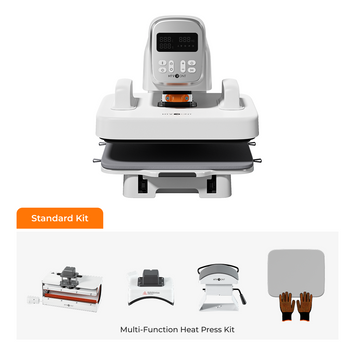
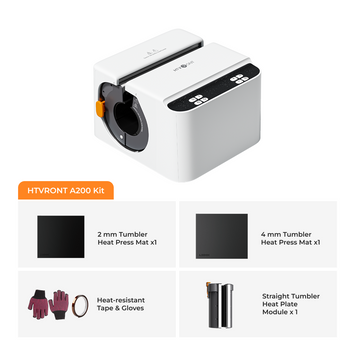
The A100 Auto Multi Heat Press is an intelligent, fully automatic heat press with a tool-free quick-swap design that lets you switch between flat press, hat press, and tumbler press modules — making it a true automatic 3-in-1 heat press machine. In our previous tutorial, we learned how to use the A100 flat heat plate for T-shirts and HTV projects, including pressing thick materials and larger flat surfaces. In this second tutorial, we'll cover how to switch modules and use the hat heat plate for caps and hats.

💡 Series Navigation:

📘 Lesson 1: How to Use A100 Flat Heat Plate — T-Shirt & HTV Pressing Guide

📘 Lesson 2: How to Use A100 Hat Heat Plate — Cap Pressing Guide (this guide)

📘 Lesson 3: How to Use A100 Tumbler Heat Plate — 20 oz Sublimation Guide (coming soon)


📦 Materials Preparation

What's in the Package Box

  • ✅ HTVRONT A100 Auto Multi Heat Press x 1
  • ✅ 12×10 in Heat Plate x 1
  • ✅ 20 oz Tumbler Heat Plate x 1
  • ✅ Large Hat Heat Plate x 1
  • ✅ 12×10 in Heat Press Mat x 1
  • ✅ Quick Start Guide x 1
  • ✅ Heat-Resistant Gloves x 1 Pair

📌 Note: This tutorial focuses on the Large Hat Heat Plate. The 20 oz Tumbler Heat Plate will be covered in the next tutorial.

Additional Supplies You'll Need

  • 🧢 Hat or Cap (baseball cap, trucker hat, bucket hat)
  • 🎨 Design (HTV / DTF / Sublimation print)
  • 🛡️ PTFE sheet (non-stick protective sheet)
  • 📏 Heat-resistant tape (to secure design)
  • ✂️ Scissors

💡 Material Tip: For best results, use adult hat sizes 7-8. The curved hat plate is designed to fit most standard baseball caps, trucker hats, and bucket hats. If your design is made with sublimation ink, ensure your hat has polyester content above 70% for optimal color vibrancy.

What you need for heat press a hat with A100 Multi Heat Press

⚙️ Step-by-Step: How to Use A100 Hat Heat Plate

Follow these steps carefully. The entire process takes about 10 minutes.


📍 Part 1: Installation & Mode Switching

⚠️ Before you begin: Put on your heat-resistant gloves and keep the machine plugged in. Ensure the heat plate connector is disconnected.

Remove the Flat Heat Plate

  1. Pull out the ironing board, unhook the four straps on both sides of the mat, and remove the heat press mat.
  2. Hold the 12×10 in Heat Plate handles. Press the release button with your thumbs and remove the plate. Place it on the mat you just removed.
Hold the handle and press the release button

Select Hat Mode

  1. Press and hold the "Mode" button to enter mode selection.
  2. Press the "Mode" buttonrepeatedly to cycle through the modes:
    • 👕 T-shirt Mode (flat plate)
    • Tumbler Mode (cup/tumbler plate)
    • 🧢 Hat Mode (cap/hat plate)
    • ⚙️ Custom Mode (thick materials)
  3. 📌 Note: If no mode is selected within 60 seconds, the machine will return to the previous mode and enter standby.
  4. Since we're using the hat heat plate, select Hat Mode. Once selected, press the "Start" button to confirm.
  5. The machine will then adjust its height automatically and enter standby mode.

Install the Hat Heat Plate Base

  1. Align the down-right corner of the hat heat plate base with the marks on the board.
  2. Rotate it counterclockwise until it locks in place.
  3. The base is correctly locked when its edge aligns with the horizontal line on the board.
  4. 📌 Note: The screw beside the large hat heat plate base is a spare part. If the base wobbles slightly after rotation, use it to improve stability. Otherwise, it is not required.
Install the hat heat plate base step 1
Install the hat heat plate base step 2
Install the hat heat plate base step 3
Install the hat heat plate base step 4
Install the hat heat plate base step 5
Install the hat heat plate base step 6

Install the Hat Heat Plate

  1. Hold the hat heat plate firmly with both hands and align the mounting block with the main unit slot.
  2. Lift upward until the heat plate is securely locked in place.
Install the large hat heat plate

Connect the Heat Plate

Finally, reconnect the heat plate connector. Align it with the arrow as shown and insert it firmly until fully secured.

Align it with the arrow as shown and insert it firmly until fully secured

📍 Part 2: Settings & Preheating

  1. Press the power button, then set your temperature, time, and pressure according to the Quick Reference Chart.
  2. The "Start" button will turn red, indicating the machine is heating up.
  3. ⚠️ Quick safety reminder: While the machine is heating, wear heat-resistant gloves and avoid touching the heat plate or surfaces with bare hands.
  4. While it heats, prepare your materials:
    • Place the hat onto the base
    • Press down the hat stretcher to secure the hat on the base
    • Attach your design with heat-resistant tape
    • Cover with a PTFE sheet
Buttons Introduction of A100 Multi Heat Press

📍 Part 3: Automatic Heat Pressing

  1. When you hear a beep and the "Start" button turns green, the machine is ready.
  2. Push the ironing board back in until you hear a beep.
  3. Press "Start" — the machine will lower automatically and begin pressing.
  4. When the countdown finishes, the machine lifts up with a beep.
  5. Pull out the ironing board and remove your hat.

✅ That's the full workflow for using the hat heat plate!

Quick Reference Chart

Quick Reference Chart 1 for A100 Multi Heat Press
Quick Reference Chart 2 for A100 Multi Heat Press

🔧 Troubleshooting Common Hat Pressing Issues

Issue Possible Cause Solution
Design shifted during pressing Design not taped securely Use heat-resistant tape to secure design edges
Wrinkles on hat after pressing Hat not stretched flat Press down hat stretcher firmly before pressing
Uneven transfer on curved areas Insufficient pressure on curved surface Increase pressure slightly; ensure hat base is locked
Hat base wobbles Base not fully locked or spare screw not used Rotate base fully counterclockwise; use spare screw if needed
Design peeling after wash Temperature too low or time too short Adjust settings per Quick Reference Chart

📺 Video Tutorial: A100 Hat Heat Plate

Watch the 4-minute 3-second video below for a complete visual walkthrough of the A100 hat heat plate process.


📚 What's Next in the A100 Tutorial Series?

You now know how to switch modules and use the A100 hat heat plate for caps and hats. In the next tutorial, we will cover:

  • Lesson 3: How to Use A100 Tumbler Heat Plate — 20 oz Sublimation Guide

Stay tuned and happy pressing! 🎨

📘 Previous Tutorial: How to Use A100 Flat Heat Plate — T-Shirt & HTV Pressing Guide


❓ Frequently Asked Questions (FAQ)

Q: What types of hats can I press with the A100 hat heat plate?

A: The A100 hat heat plate works with most standard hats including baseball caps, trucker hats, and bucket hats. For best results, use adult hat sizes 7-8.


Q: Why won't my hat heat plate base lock into place?

A: Align the down-right corner with the marks on the board and rotate counterclockwise until the edge aligns with the horizontal line. If it still wobbles, use the spare screw to improve stability.


Q: Can I use the same temperature settings as the flat heat plate?

A: Hat pressing typically requires slightly higher temperatures (320-330°F) due to the curved surface and thicker material construction. Refer to the Quick Reference Chart above.


Q: How do I prevent wrinkles on the hat during pressing?

A: Make sure to press down the hat stretcher firmly to secure the hat on the base. The hat should be smooth and taut before pressing.


Q: The machine won't recognize the hat heat plate. What's wrong?

A: First, ensure you've selected Hat Mode in the mode selection menu. Second, check that the heat plate connector is fully inserted. If the issue persists, power cycle the machine and try again.



📧 Need help? Contact HTVRONT support: support@htvront.com

New Launch! What is A100 Auto Multi Heat Press?

New Launch! What is A100 Auto Multi Heat Press?

Tia Isom

HTVRONT A100 is a 3-in-1 automatic multi heat press that combines T-shirt, hat, and tumbler pressing in one compact machine. Its tool-free quick-swap design lets you change heat plates instantly....

Monthly Heat Press Checklist

Monthly Heat Press Checklist: Don't Skip Step #3

Tia Isom

A Reddit user's heat press failure inspired this monthly checklist. Weekly: clean platen and inspect Teflon sheets. Monthly: verify temperature, check the pressure knob and hinges, and perform the paper...

10 Mother's Day DIY Ideas That'll Surprise Mom

10 Mother's Day DIY Ideas That'll Surprise Mom

Tia Isom

Mother's Day 2026 is May 10. This guide shares 10 DIY gift ideas using HTVRONT heat presses, DTF printers, laser engravers, and paint-by-number machines — from custom T-shirts and tote...

8 easter-style phone case

10 Sublimation Ideas for H17 Phone Case Heat Press: Easter Edition

Tia Isom

Get ready for Easter with 10 creative sublimation ideas designed for the H17 phone case heat press. From playful bunny ears and "Egg Hunt Champion" designs to elegant watercolor florals...

Where Can You Use DTF Printing

Where Can You Use DTF Printing? A Practical Guide to Hats, Apparel, Shoes, and Pet Scarves

Tia Isom

DTF (Direct-to-Film) printing is highly versatile, but results depend on heat tolerance, pressability, and real-world wear. This practical guide explains where DTF works best—hats, apparel, shoes, and pet scarves—plus what...

a Easter style canvas, H1 Mini Heat press, Vinyl Cutter

Easter Alphabet Magic: 5 Festive Font Styles You Can Cut & Press in Minutes

Tia Isom

Looking for the perfect Easter letters for your heat press projects? Download 5 free alphabet sets in festive styles—whimsical bunny ears, soft watercolor, rustic farmhouse, playful egg-shaped, and bold glitter....

10 Easter DIY Projects

10 Easter DIY Projects: From Simple Crafts to Show-Stopping Decor (2026)

Tia Isom

Discover 10 Easter DIY projects for 2026, ranging from beginner-friendly crafts to advanced show-stopping decor. Learn how to use heat press with heat transfer vinyl, DTF printer for full-color transfers,...

When is Easter 2026? Uncovering the Date, Origins, and Meaning of the Holiday

When is Easter 2026? Uncovering the Date, Origins, and Meaning of the Holiday

Tia Isom

Easter 2026 falls on April 5 (Western) and April 12 (Orthodox). This comprehensive guide explains why the date changes each year, the religious significance of the resurrection, the pagan origins...

Read More >>
What is A100 Auto Multi Heat Press

What is A100 Auto Multi Heat Press

Tia Isom

The HTVRONT A100 Auto Multi Heat Press is an all-in-one 3-in-1 automatic heat press. With its tool-free quick-swap design, it handles flat press (T-shirts), hat press (caps), and tumbler press...

How to Heat Press Shirts with A100 Auto Multi Heat Press

How to Heat Press Shirts with A100 Auto Multi Heat Press

Tia Isom

The HTVRONT A100 Auto Multi Heat Press is a 3-in-1 automatic heat press with tool-free quick-swap design for flat press, hat press, and tumbler press. This tutorial shows you how...

D2 DTF Printer printing Mother's Day T-shirts

Love You, Mom! Business Inspiration for D2 DTF Printers

Tia Isom

No clogged printheads. No costly maintenance. No heavy upfront investment. The D2 DTF Printer is the worry-free start for your DTF business. The heat press featured in this video is...

Preheat, dry, and perform vacuum sublimation. New phone case ready

Preheat, dry, and perform vacuum sublimation. New phone case ready

Tia Isom

Your browser does not support the video tag. The heat press featured in this video is the H17 Phone Case Heat Press — designed for precise, professional sublimation results at...

White H17 Phone Case Heat Press

Making Cute Teddy Bear Phone Cases Using the H17 Heat Press - Sublimation Idea

Tia Isom

Your browser does not support the video tag. The heat press featured in this video is the H17 Phone Case Heat Press — a compact, easy-to-use machine designed specifically for...

Hand-Draw Your Love - Creative Sublimation Ideas for Phone Cases

Hand-Draw Your Love - Creative Sublimation Ideas for Phone Cases

Tia Isom

Your browser does not support the video tag. The heat press featured in this video is the H17 Phone Case Heat Press — designed to bring your hand-drawn artwork to...

Heat Press Kraft paper bag with H1 Mini Heat Press

Bring your DIY Kraft paper bag creations to life with the H1 Mini Heat Press

Tia Isom

Your browser does not support the video tag. The heat press featured in this video is the H1 Mini Heat Press — compact, portable, and perfect for DIY projects on...

heat pressing wooden coasters with pink H1 Mini heat press

Can wooden coasters be customized using a heat press

Tia Isom

Your browser does not support the video tag. The heat press featured in this video is the H1 Mini Heat Press — compact, portable, and perfect for detailed DIY projects...