Driver Update for LOKLiK iEngrave
If your Mac prompts you to update the driver when connecting to LOKLiK iEngrave, please update the driver to version: CH34XSER.
1. Driver Download: CH34XSER
Download Link: CH34XSER
System Requirements:
- OS X 10.9 to OS X 10.15
- OS X 11.0 (Big Sur) and above
2. Installation
Please select the appropriate driver format for your Mac (.dmg or .pkg) based on your system version and chip type.
How to Check for Rosetta:
- Click the Apple logo in the top-left corner → About This Mac → System Report.
- In the sidebar, select Software → Installed Software, and search for "Rosetta".
- If nothing appears, Rosetta may not be installed on your computer.
(1) Installing the .pkg Driver
- Double-click the driver file and follow the on-screen instructions to complete the installation.
- Perform the following additional steps based on your macOS version:
-
For macOS 11.0 and above:
- Open Launchpad.
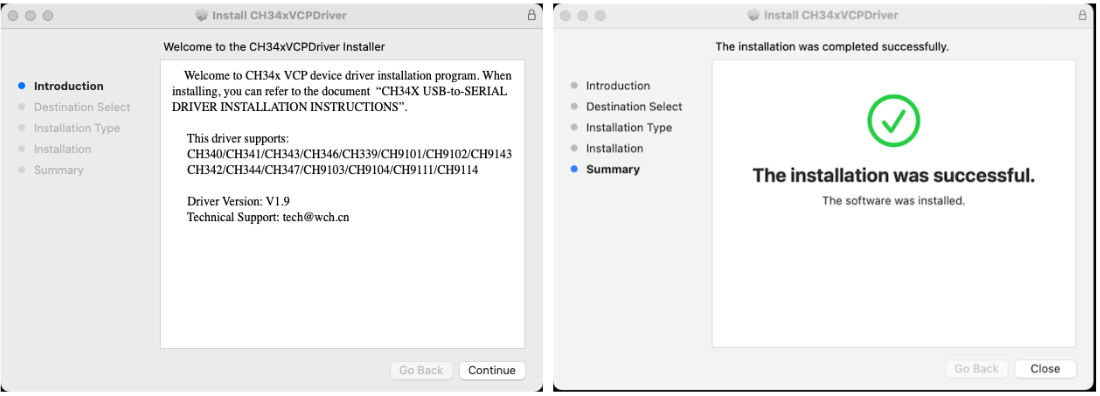
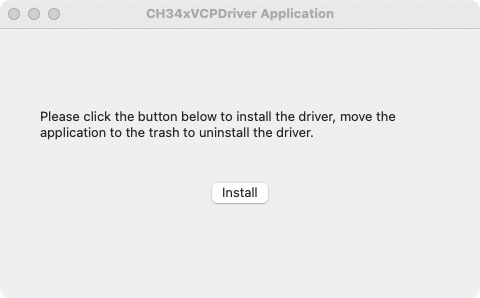
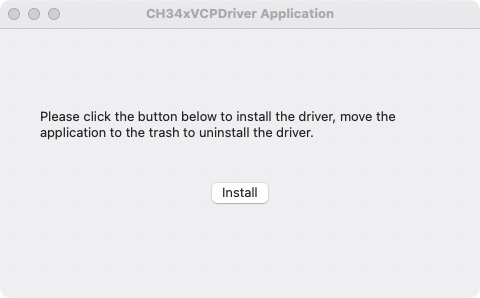
- Locate and open the CH34xVCPDriver application.
- Click the Install button within the application.
-
For macOS 10.9 to 10.15:
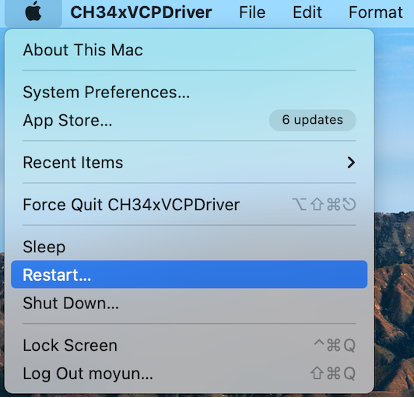
- After completing the driver installation, click Restart to reboot your computer.
- Once your Mac has restarted, proceed with the steps below.
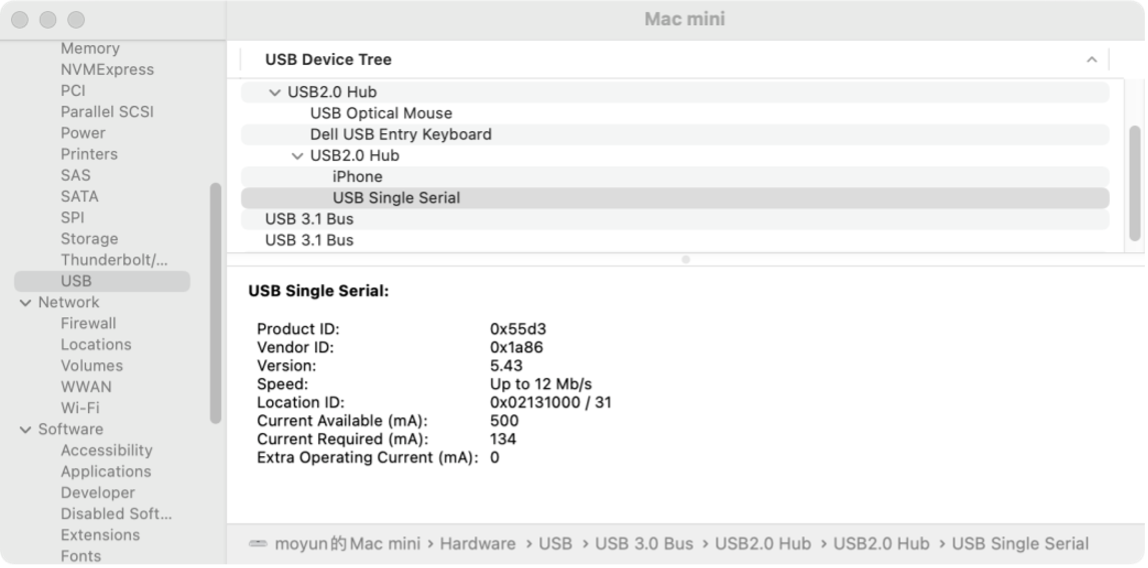
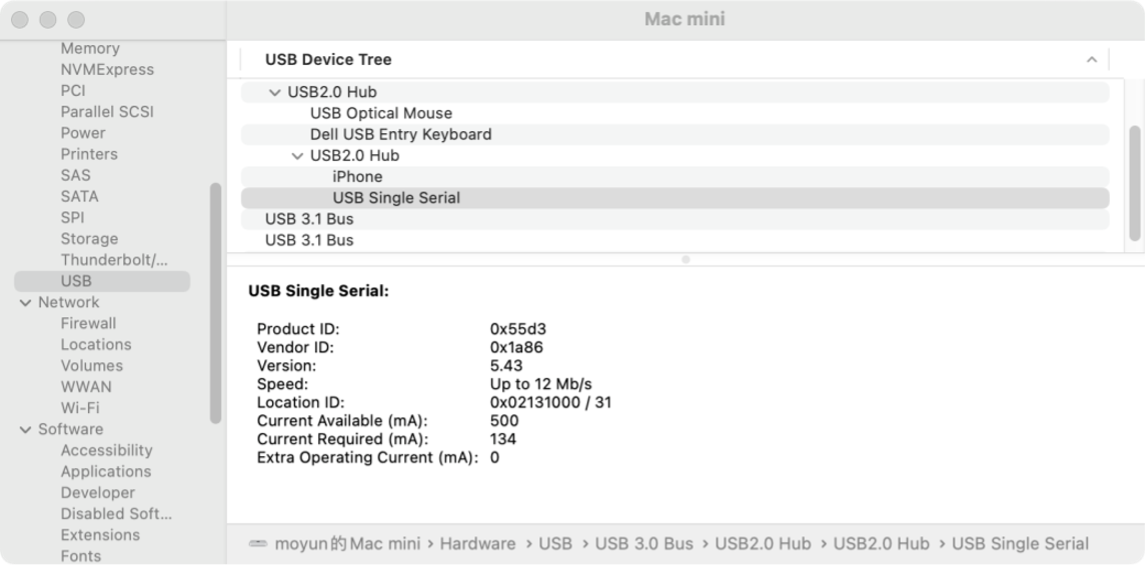
- After inserting the USB-to-Serial device into the USB port, open System Report → Hardware → USB.
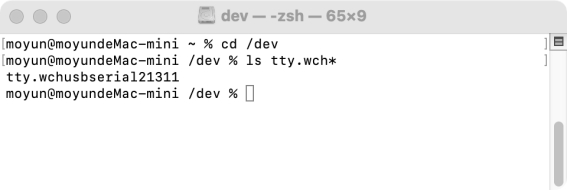
- Open the Terminal application and enter the command:
ls /dev/tty*.
If the USB device is working correctly, you will find a device with Vendor ID: [0x1a86].
After entering the command, you should see something like tty.wchusbserialx. If not, please restart your computer and try again.
(2) Installing the .dmg Driver
- Click the
.dmgfile, then drag the CH34xVCPDriver into the system's Applications folder. - Open Launchpad, locate the CH34xVCPDriver application, open it, and click the Install button.
- After inserting the USB-to-Serial device into the USB port, open System Report → Hardware → USB.
If the USB device is working properly, you should see a device with Vendor ID: [0x1a86].
(3) Security Permissions
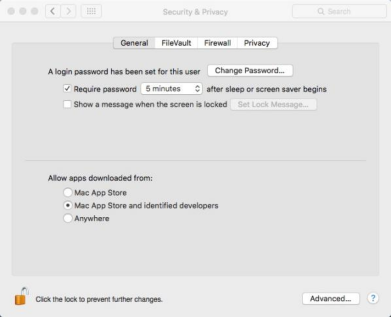
macOS High Sierra 10.13 introduced a new feature requiring user approval before loading new third-party kernel extensions.
If you see a message saying “Cannot verify developer”, go to System Settings → Privacy & Security, and click “Allow Anyway”.
3. Post-Installation Check
After completing the installation, please restart your computer. Then connect the open-frame laser engraver via USB.
If no prompt to update the driver appears when searching for the device, the driver has been successfully updated.
4. Uninstalling the Driver
- OS X 10.9–10.11: Open the Terminal and enter the following commands:
- OS X 10.12–10.15: Open the Terminal and enter the following commands:
- OS X 11.0 and above: Move the application to Trash to uninstall. Restart your computer before reinstalling the driver.
sudo rm -rf /Library/Extensions/CH34xVCPDriver.kext sudo rm -rf /var/db/receipts/*CH34xVCPDriver*.*
sudo rm -rf /Library/Extensions/CH34xVCPDriver.kext sudo rm -rf /Library/Extensions/CH34xVCPControlDriver.kext sudo rm -rf /var/db/receipts/*CH34xVCPDriver*.* sudo rm -rf /var/db/receipts/*CH34xVCPControlDriver*.*
Other Guest Post
The Hidden Intelligence: How Heat Press DIY Activities Boost Your Child's Cognitive Development
Tia Isom
Heat press DIY activities with heat transfer vinyl do more than create custom t-shirts—they build fine motor skills, executive function, creativity, and self-efficacy. This article explores the research-backed cognitive benefits...
Parent-Child Heat Press Fun: Creating Pet-Themed T-Shirts Together
Tia Isom
A heartwarming family story: making Thanksgiving pet-themed T-shirts with kids using a heat press, regular HTV, and puff vinyl. Tips for creativity, bonding, and lasting memories.
How DTF Printers Make Your T-shirt Designs Come to Life
Tia Isom
DTF printers deliver vivid colors, sharp details, and lasting durability on almost any fabric. No weeding, no screen setup—just print, powder, cure, and press. Perfect for complex designs and small...
When Should You Use a Teflon Sheet? Heat Press Advanced Guide
Tia Isom
When to use a Teflon sheet in heat press projects—and when to keep it away. Essential for DTF curing, puff HTV, delicate fabrics; never use on tumbler or phone case...
Does Your Design Need Mirroring? One Article Explains It All
Tia Isom
Heat press mirroring made simple: HTV, DTF, and sublimation all require mirroring before cutting or printing. Learn why with the letter "R" test. Includes quick reference chart and golden rule.
The Fabric Code: The Ultimate Guide to HTV Heat Pressing on Different Materials
Tia Isom
HTV fabric compatibility explained: cotton, polyester, down jackets, knits, and leather. Learn the science of mechanical interlocking, coating interference, and plasticizer migration. Includes temperature settings and Teflon sheet tips.
The Science Behind Your Tumbler Heat Press: Why Do Designs Stick Forever?
Tia Isom
Discover the science behind sublimation on tumblers: solid dye becomes gas, bonds with polymer coating, and locks permanently inside. Learn temperature, time, pressure, and how to prevent ghosting and fading.
How to Maintain a Heat Press
Tia Isom
Keep your heat press running like new with proper maintenance—daily cleaning, weekly accuracy checks, monthly inspections. Extend machine life and achieve consistent, professional transfers every time.
Other Video
How to Use Auto Heat Press 2
Tia Isom
Your browser does not support the video tag. Watch the tutorial and discover how the HTVRONT Auto Heat Press 2 simplifies your heat transfer projects with its automatic features and...
What is A100 Auto Multi Heat Press
Tia Isom
The HTVRONT A100 Auto Multi Heat Press is an all-in-one 3-in-1 automatic heat press. With its tool-free quick-swap design, it handles flat press (T-shirts), hat press (caps), and tumbler press...
How to Heat Press Shirts with A100 Auto Multi Heat Press
Tia Isom
The HTVRONT A100 Auto Multi Heat Press is a 3-in-1 automatic heat press with tool-free quick-swap design for flat press, hat press, and tumbler press. This tutorial shows you how...
Love You, Mom! Business Inspiration for D2 DTF Printers
Tia Isom
No clogged printheads. No costly maintenance. No heavy upfront investment. The D2 DTF Printer is the worry-free start for your DTF business. The heat press featured in this video is...
Preheat, dry, and perform vacuum sublimation. New phone case ready
Tia Isom
Your browser does not support the video tag. The heat press featured in this video is the H17 Phone Case Heat Press — designed for precise, professional sublimation results at...
Making Cute Teddy Bear Phone Cases Using the H17 Heat Press - Sublimation Idea
Tia Isom
Your browser does not support the video tag. The heat press featured in this video is the H17 Phone Case Heat Press — a compact, easy-to-use machine designed specifically for...
Hand-Draw Your Love - Creative Sublimation Ideas for Phone Cases
Tia Isom
Your browser does not support the video tag. The heat press featured in this video is the H17 Phone Case Heat Press — designed to bring your hand-drawn artwork to...
Bring your DIY Kraft paper bag creations to life with the H1 Mini Heat Press
Tia Isom
Your browser does not support the video tag. The heat press featured in this video is the H1 Mini Heat Press — compact, portable, and perfect for DIY projects on...


Cart Unlocks Add-On Deals