Cutting Parameters

Written by Tia Isom

|

Published on

|

Modified on

|

Reading time for 1 min

How to Set Up Cutting Parameters?

Before Setting Up:

You can click "Make" to set up the "Mode," "Cutting Mat," "Cutting Parameters," and "Material Parameters". Hover over the mouse on the "?" icon (the "?" is unclickable if not set up) and click "click here" to check the cutting parameters listed below.

Setup Instructions

LOKLiK iCraft:

Material Settings:

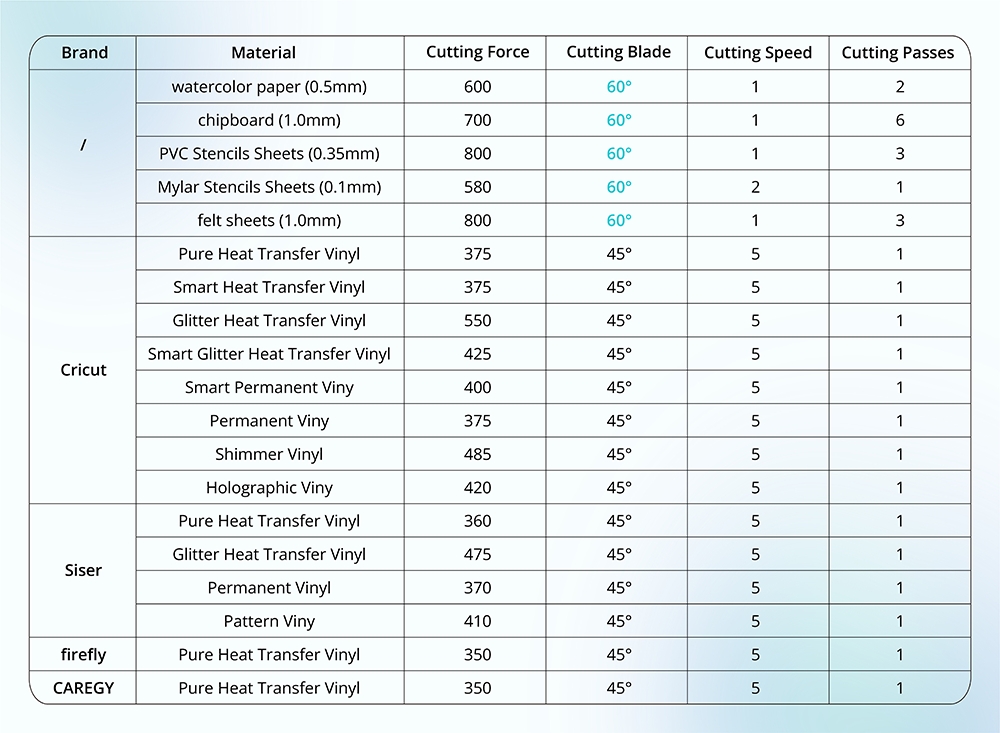
Please refer to the chart below for more cutting settings. If you cannot find your material below, try a test cut with a similar material setting. If you cannot cut through the material under maximum pressure, try to cut more times.

Material Chart

Notes:

  • Ensure the blade is in good condition and fastened.

  • Calibrate the cutting force before cutting to find the best cutting force value.

FAQs:

Cannot cut through the material, or the cutting force is too strong?

  • ① Calibrate the cutting force and adjust the cutting parameter to cut again.
  • ② The blade may dull after a long time of use; please replace a new blade and cut again.
  • ③ Ensure the blade is fastened or the blade housing is functional; otherwise, fasten the blade or replace the blade housing.

LOKLiK Crafter:

Blade Instruction:

  • 45° Red Blade: Fine-point blade is suitable for cutting thin materials, including heat transfer vinyl, permanent vinyl, sticker, printable vinyl, etc.
  • 60° Blue Blade: Deep-point blade is suitable for cutting thick materials, including cardstock, chipboard, PVC/mylar stencil sheets, felt, etc.

Cutting Setting Instructions:

  • Cutting Force Value:
    • LOKLiK/HTVRONT: 1.0 - 11.0; the bigger the value, the heavier the force.
    • Other Brands: 100 - 800; ditto.
    • (*Higher value is recommended for thicker materials.)
  • Cutting Speed: 1-10; the higher value means faster speed. (*Lower speed is recommended for thicker materials.)
  • Cutting Passes: 1-10; if you need to cut thick or rigid material, you can try to cut the material twice or more.

Material Settings:

Please refer to the chart below for more cutting settings. If you cannot find your material below, try a test cut with a similar material setting. The maximum cutting thickness for the LOKLiK Crafter is 1.0mm. The maximum thickness varies depending on the rigidness and thickness of the materials. If you cannot cut through the material under maximum pressure, try to cut more times.

Material Settings Chart
Additional Settings

Leave a comment

What Can You Use DTF Printing On-blog cover-2026

What Can You Use DTF Printing On? A Practical Guide to Hats, Apparel, Shoes, and Pet Scarves

Tia Isom

DTF works on cotton, polyester, blends, and more—apparel, hats, shoes, pet scarves, tote bags. Success depends on heat tolerance, pressability, and real-world wear. Test curved or high-friction items before scaling

Can a Phone Case Heat Press Machine Press DTF Prints-blog cover-2026

Can a Phone Case Heat Press Machine Press DTF Prints?

Tia Isom

No. Phone case heat presses are built for vacuum sublimation—film vinyl softens and wraps 3D edges. DTF vinyl/film isn't compatible with vacuum forming, causing distortion, bubbling, and edge failure. Keep...

What is the difference between H17 Phone Case Heat Press and other heat press-blog cover-2026

What is the difference between H17 Phone Case Heat Press and other heat press?

Tia Isom

The H17 is purpose-built for contoured phone cases—using sublimation film vinyl that conforms under heat, plus vacuum-assisted air removal for consistent contact on edges, corners, and raised camera rings.

10 Things You Must Know Before You Start Sublimation Heat Pressing-blog cover-2026

10 Things You Must Know Before You Start Sublimation Heat Pressing

Tia Isom

Most sublimation failures come from predictable issues: wrong blanks, moisture, paper shift, pressure, temperature, ghosting, contamination, surface prep, color management, and design limits. Master these ten checkpoints for repeatable, vibrant...

a Easter style canvas, H1 Mini Heat press, Vinyl Cutter

Easter Alphabet Magic: 5 Festive Font Styles You Can Cut & Press in Minutes

Tia Isom

Looking for the perfect Easter letters for your heat press projects? Download 5 free alphabet sets in festive styles—whimsical bunny ears, soft watercolor, rustic farmhouse, playful egg-shaped, and bold glitter....

How to Start a Small DTF Printing Business at Home

How to Start a Small DTF Printing Business at Home

Tia Isom

Starting a home-based DTF printing business is easier than ever with modern DTF printers and reliable heat press machines. This guide explains the essential equipment, including dtf transfer sheets, dtf...

10 Easter DIY Projects

10 Easter DIY Projects: From Simple Crafts to Show-Stopping Decor (2026)

Tia Isom

Discover 10 Easter DIY projects for 2026, ranging from beginner-friendly crafts to advanced show-stopping decor. Learn how to use heat press with heat transfer vinyl, DTF printer for full-color transfers,...

How to Wash HTV Shirts So They Never Peel or Fade: The Complete Guide

How to Wash HTV Shirts So They Never Peel or Fade: The Complete Guide

Tia Isom

This guide covers everything you need to know about washing and caring for HTV shirts. From the crucial 24‑hour waiting period after pressing to the best detergent and drying practices,...

Read More >>
How to Use Auto Heat Press 2

How to Use Auto Heat Press 2

Tia Isom

Your browser does not support the video tag. Watch the tutorial and discover how the HTVRONT Auto Heat Press 2 simplifies your heat transfer projects with its automatic features and...

What is A100 Auto Multi Heat Press

What is A100 Auto Multi Heat Press

Tia Isom

The HTVRONT A100 Auto Multi Heat Press is an all-in-one 3-in-1 automatic heat press. With its tool-free quick-swap design, it handles flat press (T-shirts), hat press (caps), and tumbler press...

How to Heat Press Shirts with A100 Auto Multi Heat Press

How to Heat Press Shirts with A100 Auto Multi Heat Press

Tia Isom

The HTVRONT A100 Auto Multi Heat Press is a 3-in-1 automatic heat press with tool-free quick-swap design for flat press, hat press, and tumbler press. This tutorial shows you how...

D2 DTF Printer printing Mother's Day T-shirts

Love You, Mom! Business Inspiration for D2 DTF Printers

Tia Isom

No clogged printheads. No costly maintenance. No heavy upfront investment. The D2 DTF Printer is the worry-free start for your DTF business. The heat press featured in this video is...

Preheat, dry, and perform vacuum sublimation. New phone case ready

Preheat, dry, and perform vacuum sublimation. New phone case ready

Tia Isom

Your browser does not support the video tag. The heat press featured in this video is the H17 Phone Case Heat Press — designed for precise, professional sublimation results at...

White H17 Phone Case Heat Press

Making Cute Teddy Bear Phone Cases Using the H17 Heat Press - Sublimation Idea

Tia Isom

Your browser does not support the video tag. The heat press featured in this video is the H17 Phone Case Heat Press — a compact, easy-to-use machine designed specifically for...

Hand-Draw Your Love - Creative Sublimation Ideas for Phone Cases

Hand-Draw Your Love - Creative Sublimation Ideas for Phone Cases

Tia Isom

Your browser does not support the video tag. The heat press featured in this video is the H17 Phone Case Heat Press — designed to bring your hand-drawn artwork to...

Heat Press Kraft paper bag with H1 Mini Heat Press

Bring your DIY Kraft paper bag creations to life with the H1 Mini Heat Press

Tia Isom

Your browser does not support the video tag. The heat press featured in this video is the H1 Mini Heat Press — compact, portable, and perfect for DIY projects on...